Setting up a network that can ping google but not able to ping Facebook in the same system without…
The first question that arise on your mind after seeing this title is “Why I want to block Facebook? What is the need for this?”. The answer for your question is may be you have kids in your home or they may be lying you by saying they are attending online class but actually they are wasting their precious time in Social Networks. It is more common nowadays since this Pandemic happened.
Ok. Lets come to the point.
Here we are going to see how to block Facebook but ensure the access to Google in the same system. May be you had seen this setup in your college systems where we are not allowed to use some kind of the websites.
But before this you should know some basic Linux Networking concepts and terminologies.
Note: Here I am using Redhat Enterprise Linux (RHEL8) which is hosting by Oracle VirtualBox.
IP address
In simple words, it is like your mobile number which is used for identified you uniquely. Every computer have their unique IP address. IP stands for “Internet Protocol”, which is the set of rules governing the format of data sent via the internet or local network.
IP addresses are not random. They are mathematically produced and allocated by the Internet Assigned Numbers Authority (IANA), a division of the Internet Corporation for Assigned Names and Numbers (ICANN). ICANN is a non-profit organization that was established in the United States in 1998 to help maintain the security of the internet and allow it to be usable by all. Each time anyone registers a domain on the internet, they go through a domain name registrar, who pays a small fee to ICANN to register the domain.
IP address is of two types based on the number of octates namely IPv4 and IPv6.
IPv4
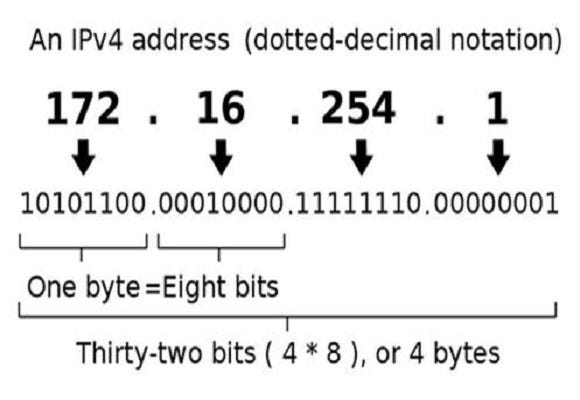
After figure clearly explains about IPv4. Its size is 32 bits or 4 bytes. Each number in the set can range from 0 to 255. So, the full IP addressing range goes from 0.0.0.0 to 255.255.255.255. That means it can provide support for 2³² IP addresses in total around 4.29 billion. That may seem like a lot, but all 4.29 billion IP addresses have now been assigned, leading to the address shortage issues we face today.
IPv6

IPv6 utilizes 128-bit Internet addresses. Therefore, it can support 2¹²⁸ Internet addresses — 340,282,366,920,938,463,463,374,607,431,768,211,456 of them to be exact. The number of IPv6 addresses is 1028 times larger than the number of IPv4 addresses. So there are more than enough IPv6 addresses to allow for Internet devices to expand for a very long time.
We can find your system IP address in RHEL8 by using the following command.
ifconfig enp0s3

Here our IPv4 address is 192.168.43.97 and IPv6 address is fe80::ad91:551e:e05a:5ab8.
Netmask
Netmask plays a major role in finding the range of IPs in which they can ping each other. It has two parts namely Network ID and Host ID
For example, with an IP address of 192.168.100.1 and a subnet mask of 255.255.255.0, the network ID is 192.168.100.0 and the host ID is 1. With an IP of 192.168.100.1 and a subnet mask of 255.0.0.0, the network ID is 192 and the host ID is 168.100.1

In the above example, NetMask is 255.255.255.0 and if we convert host ID into binary, it has 8 zeros. 2⁸ =256 IPs available to connect.
CIDR
Classless Inter-Domain Routing, or CIDR, was developed as an alternative to traditional subnetting. The idea is that you can add a specification in the IP address itself as to the number of significant bits that make up the routing or networking portion.

For example, we could express the idea that the IP address 192.168.0.15 is associated with the netmask 255.255.255.0 by using the CIDR notation of 192.168.0.15/24. This means that the first 24 bits of the IP address given are considered significant for the network routing.
In simple words, CIDR is number of Ones in Netmask.
Gateway
A gateway is a router that provides access for IP packets into and/or out of the local network. The term “default gateway” is used to mean the router on your LAN which has the responsibility of being the first point of contact for traffic to computers outside the LAN.
The default gateway IP can be found by using the following command on RHEL8.
route -n

Here, in routing table ,the Gateway IP is 192.168.43.146. The Destination IP mentioned 0.0.0.0 indicates that we can go anywhere on Internet and accessing any websites without any restriction.
Here comes the practical part.
First we have to delete the rule which permits user to access any kind of websites. It is done by running following command.
route del -n 0.0.0.0 netmask 0.0.0.0 gw 192.168.43.146 enp0s3
After this, if you want to ping google or facebook, it wont possible

For now, even if you are having internet connection, you feels like you are in offline because your system doesn't know the gateway address, so impossible to go out.
For this, you have to add one rule to your IP table for granting access to Google only. It is done by below command.
route add -n googleip netmask 255.255.255.0 gw 192.168.43.146
You can find Google IP for your PC by running the below command.
nslookup google.com
After run these command, you can notice that your Facebook IP is not pinging and at the same time your Google IP is pinging and you have good connectivity with Google.

Thank you all for reads. Hope you enjoyed this article. Stay tuned for my next article.

Written by
Sri Vishnuvardhan
Building production-grade geospatial platforms that combine GIS, remote sensing, cloud infrastructure, AI, and platform engineering to transform spatial data into scalable, real-world intelligence.
Enjoyed this article?
Subscribe to get notified when new articles on DevOps, Cloud, and platform engineering are published.
You'll receive a welcome email with a confirmation link. No spam — unsubscribe anytime.
Have a project in mind?
I work on cloud-native platforms, DevOps automation, and geospatial intelligence systems. Let's talk.